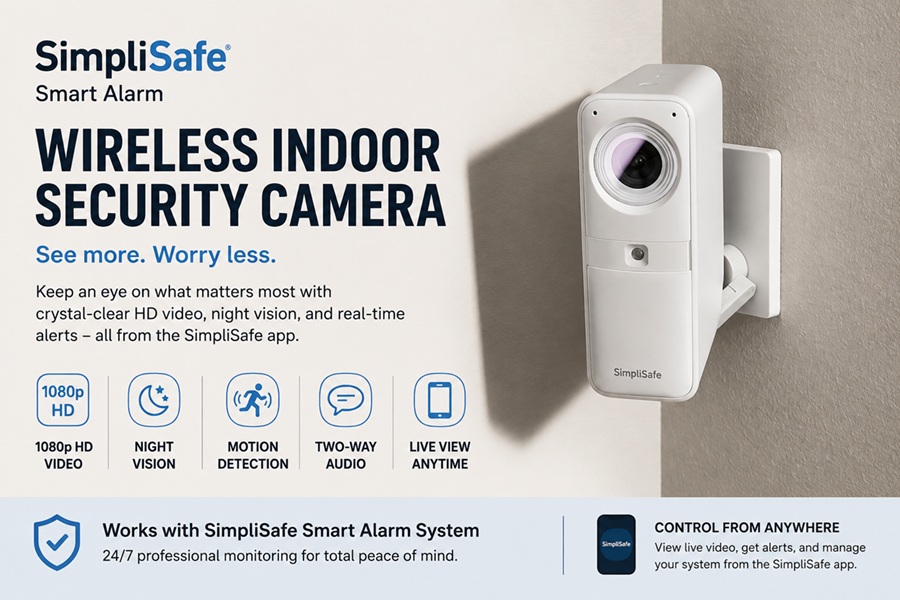
The SimpliSafe smart alarm wireless indoor security camera is designed to work as part of a broader home security system, combining live video monitoring with alarm sensors rather than functioning as a standalone gadget on its own. It connects wirelessly, so there’s no drilling into walls for wiring, and it ties directly into SimpliSafe’s alarm and professional monitoring ecosystem.
For homeowners already using or considering a SimpliSafe base system, this camera adds visual verification to alerts, meaning you don’t just get notified that a door opened, you can actually see what triggered it in real time or shortly after. Below is a closer look at how it works, what to expect from setup to daily use, and how it stacks up against standalone smart cameras.
It’s a good example of how home security has shifted over the past decade, from systems that simply made noise when something went wrong, to systems that let you actually see and respond to what’s happening from wherever you are.
Quick Facts
| Camera Type | Indoor, wireless |
| Works Independently? | Limited, best used with SimpliSafe base station |
| Video Resolution | 1080p HD (typical) |
| Night Vision | Yes |
| Two-Way Audio | Yes |
| Storage Type | Cloud storage (subscription-based) |
| Power Source | Plug-in (not battery-only) |
| Setup Time | 15 – 20 minutes via app |
How It Fits Into a SimpliSafe System
Unlike some standalone smart cameras, this one is built to communicate directly with SimpliSafe’s base station and connected sensors. When a door or motion sensor triggers an alert, the camera can provide visual confirmation of what actually happened, rather than leaving you to guess.
This integration reduces false alarms significantly, since either the monitoring center or the homeowner can review a live or recorded clip before deciding whether it’s a genuine concern or just the family cat knocking something off a shelf.
The camera also becomes part of the system’s overall event timeline, so a triggered sensor and the corresponding video clip show up together in the app, making it much easier to piece together what happened while you were away.
Key Features at a Glance
The camera is built around a handful of core capabilities that matter most for everyday indoor monitoring rather than a long list of gimmicky extras.
| Feature | Details |
| Video Quality | 1080p HD with clear daytime footage |
| Night Vision | Infrared, decent range in dark rooms |
| Motion Detection | Adjustable sensitivity zones |
| Two-Way Talk | Speak through the app in real time |
| App Alerts | Push notifications on motion or system trigger |
| Privacy Shutter | Physical or software cover option on most models |
Setup and Placement Tips
Setup generally takes 15 to 20 minutes through the SimpliSafe app, which walks through Wi-Fi pairing and account linking step by step with fairly clear on-screen instructions.
Placement matters more than most people expect. Corners near entry points, hallways, and living rooms tend to give the widest useful field of view, capturing the most relevant activity in a single frame.
- Mount near entry points like the front door or main hallway for the widest coverage
- Avoid pointing directly at windows during the day, since backlight can wash out footage
- Keep the camera at least a few feet from air vents to avoid triggering motion from moving curtains
- Position at a height of roughly 7-8 feet for the best angle on faces and activity
Subscription and Storage Considerations
Live viewing typically works without a subscription, but recorded video history and cloud storage usually require an active monitoring plan. It’s worth checking current plan tiers directly before assuming full functionality comes free with the hardware.
Without an active plan, some features like recorded clip playback may be limited or unavailable entirely, so factor the ongoing monthly cost into your overall decision, not just the upfront price of the camera itself.
How It Compares to Standalone Smart Cameras
Standalone smart cameras from other brands often work independently of any alarm system, which can be simpler for people who just want basic monitoring without a broader security setup.
The SimpliSafe camera’s real advantage is integration. If you already have, or plan to get, a full alarm system, the combined setup gives far more context per alert than a camera working in isolation ever could.
| Aspect | SimpliSafe Camera | Standalone Camera |
| Alarm Integration | Built-in | Usually none |
| Setup Complexity | Simple if already using SimpliSafe | Simple on its own |
| Best For | Existing SimpliSafe households | Single-camera, no-alarm setups |
| Monitoring Tie-In | Professional monitoring available | Self-monitoring only |
Common Questions About Privacy and Data
Indoor cameras naturally raise privacy questions, especially in shared or family homes. Most models include a physical or software-based privacy shutter that can be activated when the camera shouldn’t be recording, such as during certain hours at home.
It’s worth reviewing the specific data retention and cloud storage policy for your monitoring plan, since footage retention periods and data handling can vary between subscription tiers.
Maintaining the Camera Over Time
Once installed, an indoor camera needs relatively little ongoing attention, but a few habits keep it working reliably for years rather than becoming an ignored gadget gathering dust on a shelf.
Treat it a bit like any other small electronic device in the house: a quick glance every so often to confirm it’s still online and recording as expected goes a long way toward catching problems before they become a gap in your coverage right when you need it most.
- Wipe the lens gently every few weeks to remove dust that can blur footage
- Check the app periodically for firmware updates, which often improve motion detection accuracy
- Reposition the camera if furniture or decor changes block its field of view
- Test two-way audio occasionally to confirm the microphone and speaker are both working
Is It a Good Fit for Renters?
Because the camera is wireless and doesn’t require permanent wiring, it’s a reasonably renter-friendly option compared to hardwired alarm systems that involve drilling and panel installation.
Renters should still check their lease for any restrictions on security devices, and consider using adhesive mounts instead of screws where possible to avoid leaving marks on walls when it’s time to move out.
Comparing Cost Over Time
It helps to think of the camera’s true cost as more than just the upfront hardware price, since ongoing monitoring plans add up over a year or more of use.
| Cost Type | Typical Range |
| Camera hardware (one-time) | $80 – $150 |
| Basic monitoring plan (monthly) | $10 – $20 |
| Advanced plan with video history (monthly) | $20 – $30 |
| Estimated first-year total cost | $200 – $500 |
Placement Ideas for Multi-Camera Households
Households with more than one camera get the most value by covering distinct zones rather than clustering cameras in the same room. A common setup places one camera near the main entry, one in a central living space, and one covering a secondary entrance like a garage door or back hallway.
This layout minimizes blind spots without requiring an excessive number of devices, keeping both the hardware cost and the number of notifications manageable.
Getting the Most Value From Professional Monitoring
One detail that sets this camera apart from many standalone options is the possibility of professional monitoring, where a live agent can review an alert and contact emergency services on your behalf if needed.
This is particularly useful for households that travel often or include family members who may not check phone notifications right away, since it adds a layer of response that doesn’t depend entirely on someone being available to look at the app in the moment.
Frequently Asked Questions
Does the SimpliSafe camera work without a subscription?
Live viewing generally works without one, but recorded footage history and cloud storage typically require an active monitoring plan.
Can I use this camera without the rest of the SimpliSafe system?
It can function on its own to a degree, but its main advantage, tying video to alarm triggers, only works when paired with a SimpliSafe base station and sensors.
Is the camera battery-powered or does it need to be plugged in?
It’s designed as a plug-in device rather than battery-only, which avoids the hassle of recharging but means it needs to stay near an outlet.
How many cameras can I add to one system?
Most SimpliSafe systems support multiple indoor and outdoor cameras, though exact limits depend on your specific base station and plan.
Is this camera a good option for renters?
Generally yes, since it’s wireless and can often be mounted without permanent drilling, though it’s worth checking your lease terms first.
Does it work if my internet goes down?
Local alarm functions may still work, but live viewing, alerts, and cloud recording all depend on an active internet connection to function properly.
Can multiple family members access the camera app at once?
Yes, most plans support multiple user logins so different household members can view live feeds and receive alerts on their own devices.
Final Thoughts
The SimpliSafe smart alarm wireless indoor security camera makes the most sense as part of a connected home security setup rather than a one-off purchase. If you already trust the SimpliSafe ecosystem, adding this camera brings valuable visual context to every alert, which is often the missing piece in basic alarm-only systems. Weigh the ongoing subscription cost against the convenience it adds, and place it thoughtfully, and it becomes one of the more genuinely useful smart home additions rather than a gadget that gets ignored after the first week.